The Unix-inspired philosophy explains why I favor simple, composable tools. The five principles explain what I expect to gain: productivity, acceleration, focus, automation, and canonicality.
This is how I put those ideas into practice on a Mac. It is a description of the approach and representative examples, not a claim that everyone needs my exact configuration.
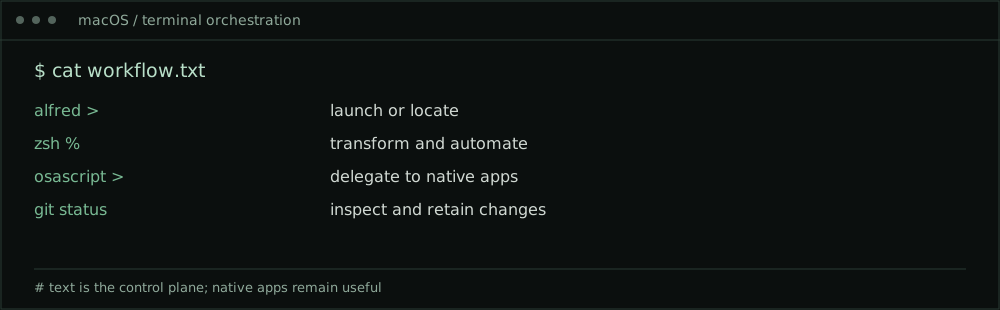
One keyboard, several interfaces
My Mac is not a terminal-only machine. macOS gives me a Unix-based environment alongside well-integrated desktop applications. I use both, but I try to keep one consistent path from intention to action.
The terminal is my primary workbench for text, code, inspection, and repeatable operations. Alfred is the fast entry point for launching applications, finding items, and triggering workflows. AppleScript and macOS automation bridge commands to applications that have their own useful native interfaces.
That separation is important. The terminal does not need to recreate what an application already does well. It only needs to make the transition deliberate and efficient.
Start with a small, predictable shell environment
I use zsh on macOS and prefer a modest set of tools whose behavior I understand. A useful environment does not require an elaborate prompt or a large collection of plugins.
For example, I can search a project, narrow the results, and open the relevant file without leaving the keyboard:
rg -n 'authentication|passkey|certificate' ~/work/notes
fd '\.md$' ~/work/notes
I use tools such as rg, fd, and sk for searching and selecting, and a terminal file manager such as yazi when navigating a tree is more useful than typing paths. The exact utility is secondary to the pattern: locate, inspect, act.
For longer-running local sessions, zellij helps organize terminal work; on remote systems I use tmux. These are ways of preserving working context, not ends in themselves.
Editing should feel immediate
I am comfortable with both Vim and Emacs keybindings. That fluency means I can move, select, and restructure text without continuously reaching for a pointing device.
For quick edits in a terminal, I favor a lightweight editor such as Helix. For richer writing, literate work, and structured notes, I can use Emacs as a native macOS application. There is no contradiction: a graphical Emacs window can still be part of a terminal-first workflow.
The practical goal is consistency in how I think about text. Whether I am editing Markdown, reviewing configuration, or working through code, the core motions are familiar.
Alfred is the front door, not another silo
Alfred gives me an immediate prompt for launching actions. I can use it to open a working folder, invoke a shell-backed workflow, or move to a native app when that is the right place to finish a task.
A useful Alfred workflow might accept a search phrase, pass it to a trusted local script, and open the matching document. Another might prompt for a project name and open the corresponding terminal workspace.
I prefer a small number of memorable workflows over dozens of shortcuts I cannot recall. A launcher should reduce decisions, not create a second application catalog to maintain.
Connect Unix to native macOS applications
macOS automation makes the boundary between command-line and desktop work less rigid. The built-in open command can hand a file or URL to its appropriate application:
open ~/work/notes/meeting-notes.md
open -a Preview ~/work/reports/architecture.pdf
AppleScript can also ask supported applications to perform specific actions. For example, this opens a new draft in Mail without sending anything:
osascript <<'APPLESCRIPT'
tell application "Mail"
    activate
    make new outgoing message with properties {subject:"Follow-up", content:"Draft notes for review"}
end tell
APPLESCRIPT
AppleScript support varies by application and version, and macOS may request Automation permissions. I grant access narrowly and avoid embedding credentials or confidential information in scripts. For applications without a useful scripting interface, Shortcuts, URL schemes, or an application’s own command-line integration may be better options.
Ordinary office work still benefits
Consider a meeting follow-up. I can capture notes in Markdown, search related decisions, refine the summary, and keep the source under version control. If I need to send an email, I can move the final text into Mail. If I need a polished document, I can generate or open the appropriate output in a native application for final review.
Or consider a technical briefing. I can keep the source material in text, track changes, generate a deliverable, and review its visual layout where it matters. The canonical source remains clear even when the audience receives a PDF, a slide deck, or a web page.
This is where terminal-first becomes useful beyond programming: the workflow is connected without requiring every step to happen in the same interface.
Use text as the source, then publish
My personal blog is an example. I write articles in Markdown, keep them with the site’s source, and let Zola turn them into web pages.
A simple validation loop looks like this:
zola check
zola serve
The first command checks the site; the second provides a local preview. I can inspect a change before publishing it, and the Markdown remains usable even if I later change the presentation layer.
The same approach applies to technical notes, procedures, and small knowledge bases. Separate the content from its rendering wherever practical.
Add AI as a reviewable collaborator
AI-assisted coding and writing fit naturally into this workflow because the inputs and outputs are already text. I can describe a change, ask for a draft, compare the proposed result, and run tests without surrendering the underlying artifact.
For code, I prefer a disciplined loop:
- State the intended behavior and constraints.
- Ask AI for a bounded proposal rather than unrestricted changes.
- Review the diff and check for unsafe assumptions.
- Run tests, linters, or local validation.
- Commit only the result I understand and accept.
For sensitive environments, I also consider what data is sent to an AI service. Tokens, customer records, private keys, and internal architecture details should not be copied into prompts without the appropriate authorization and controls. Generated shell commands are suggestions, not trusted instructions.
AI can accelerate the journey from idea to implementation. It should not bypass the engineering discipline that makes the result reliable.
Keep the system understandable
I resist the temptation to automate everything. Each new integration creates another dependency, and each shortcut needs a name, a purpose, and occasionally maintenance.
My test is simple: does this change remove friction while preserving clarity? Can I explain what it does? Can I recover when it fails? Does it preserve the correct source of truth?
If the answer is no, a few direct keystrokes may be the better design.
The outcome matters more than the tools
A terminal-first workflow is not defined by the number of commands I know. It is defined by the continuity between thinking, acting, checking, and preserving the result.
macOS gives me a useful combination: Unix foundations, native applications, AppleScript, Alfred, and increasingly capable AI assistance. I use those layers together rather than treating them as competing camps.
The terminal remains the center of gravity. The keyboard remains my most consistent interface. And text remains the durable thread connecting the work.