Over the years, we have invested heavily in making passwords safer: complexity rules, password managers, MFA, monitoring, and better storage practices. These controls have their place, but they do not change the underlying design. A password is a reusable secret, and someone who obtains it may be able to use it.
I see this as a vulnerability in the authentication model itself. Not a CVE that can be patched with a software update, but a weakness enterprises need to mitigate and progressively remove. We have standards-based alternatives now, so continuing to rely on passwords everywhere deserves a closer look.
Why passwords remain a vulnerability
There are three problems I keep coming back to.
First, passwords can be disclosed. A convincing phishing page or compromised endpoint can capture the same secret a legitimate application expects. Training users to spot every imitation is not a sustainable security boundary.
Second, passwords can be replayed. Credential reuse and stuffing allow a breach at one service to create risk elsewhere. Even password hashes, if stolen, can become an offline guessing target.
Third, passwords survive in the exceptions. Legacy applications, resets, recovery desks, and fallback authentication can leave a password route open long after an organisation has deployed stronger MFA.
For enterprises, this is reason enough to treat password dependence as a remediation priority, particularly for privileged accounts, remote access, and business-critical applications. The aim is to reduce the number of places where a stolen secret can turn into access.
Breaches reinforce the point
The 2026 Verizon DBIR reports credential abuse in 13% of identified initial-access cases and in 39% of cases when counted across the breach sequence. Those figures measure different things; I would not use them interchangeably. They do show why credentials remain relevant beyond the first point of entry.
Of course, removing passwords will not stop software exploitation, session theft, or compromised devices. But it can remove a familiar and repeatedly abused path into an account.
What FIDO changes
FIDO2 replaces the shared-secret exchange with public-key cryptography. WebAuthn, a W3C standard, defines how the application requests and verifies authentication. CTAP2, from the FIDO Alliance, supports communication with compatible roaming authenticators.
The practical difference is straightforward: the server stores a public key. The authenticator controls the private key and signs a fresh challenge. The password is no longer something the user has to reveal to the application.
This is also why FIDO is phishing-resistant. The credential is bound to the relying party’s domain. A lookalike website cannot ask the browser for a valid assertion scoped to the real website. A manually entered OTP can still be relayed by a phishing site; a correctly implemented WebAuthn exchange cannot be used in the same way.
login.example.com   -> expected RP ID -> valid ceremony
log1n.example.com   -> different RP ID -> no matching credential
replayed assertion  -> old challenge   -> rejected
The server still needs to validate the challenge, origin, RP ID, signature, and required user-verification flags. Phishing resistance comes from the protocol and its correct implementation, not from calling an authentication method passwordless.
FIDO2 authentication, step by step
Illustrative protocol walkthrough · silent autoplay and loop · use the controls to pause or replay. The diagrams show a roaming authenticator using CTAP2; platform authenticators may use internal mechanisms.
A security key can also be a smart card
Security keys are often pictured as USB devices. They do not have to be. HID Crescendo smart cards function as FIDO security keys on supported models and with compatible readers, including deployments using the OMNIKEY 5022.
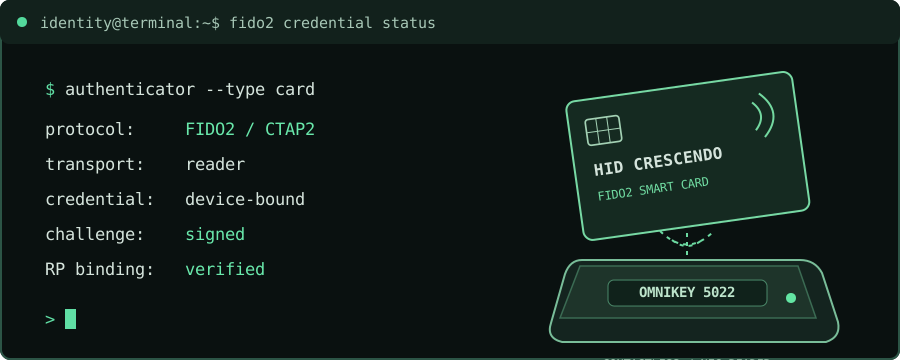
This matters when an organisation already issues employee badges. A suitably equipped card can carry separate credentials for FIDO2, PKI-based desktop authentication, and physical access. It does not make those systems one protocol, but it gives employees a familiar credential form factor while the enterprise manages distinct trust relationships.
Synced and device-bound passkeys
Both use FIDO cryptography and can be phishing-resistant. The distinction is how the credential is held and recovered.
Synced passkey
Where: Available across devices through a passkey provider.
Advantage: Convenient sign-in and recovery.
Consider: Provider account and recovery security.
Fit: Broad employee and customer adoption.
Device-bound passkey
Where: Stays with a specific authenticator, such as a compatible smart card.
Advantage: Tighter control over credential custody.
Consider: Lost-card replacement and backup access.
Fit: Managed and higher-risk accounts.
For general workforce and customer adoption, synced passkeys can simplify the user experience. For privileged or tightly managed environments, device-bound credentials can provide more control over where the private key resides. Neither choice removes the need for secure enrolment, recovery, and revocation. Hardware assurance and attestation, where required, must be verified separately.
Patching the broader identity environment
I would not frame this as passkeys everywhere. The better question is where passwords can be removed, and which mechanism fits the workflow.
- FIDO2 and passkeys for phishing-resistant interactive sign-in.
- PKI and smart cards for certificate-based authentication on managed systems.
- Verifiable credentials for presenting and checking trusted claims; they are not, by themselves, a replacement for every login.
- Federation to extend strong upstream authentication across applications, provided weaker fallback paths are addressed.
- Workload identity and short-lived credentials for applications and services that should not depend on static passwords.
These are not silver bullets. An attacker with a stolen session, a compromised endpoint, or a way through account recovery may still succeed. But removing reusable passwords reduces one important attack surface and allows us to focus controls on the remaining risks.
Where I would start
For an enterprise, I would approach this as a staged remediation programme rather than a one-off passwordless project.
- Identify exposure. Find password-backed access to critical applications, privileged accounts, remote access, and recovery workflows.
- Select the right credentials. Use FIDO2 for supported user journeys, and PKI or other cryptographic approaches where they make more operational sense.
- Fix the lifecycle. Secure credential issuance, replacement, recovery, and revocation. Remove password fallback where feasible.
- Measure what remains. Track password-dependent logins and recovery paths alongside phishing-resistant adoption, rather than measuring enrolments alone.
Passwords need mitigating, not better excuses
I am not suggesting that every organisation can eliminate passwords tomorrow. Legacy systems and operational constraints are real. But accepting those constraints should not mean leaving password risk unaddressed indefinitely.
A password is a vulnerability in the authentication model that we can mitigate by replacing the reusable secret. FIDO2 and passkeys are a practical starting point. PKI, smart cards, and other cryptographic credentials broaden what can be addressed. The result is not perfect security; it is a smaller, more defensible attack surface.
References
- FIDO Alliance — FIDO2 specifications
- W3C — Web Authentication
- NIST SP 800-63B
- HID — Crescendo Smart Cards
- Verizon — 2026 DBIR
Explore the companion tool: Identity Exposure Observatory.